Yes, the Nintendo Switch 2 can now use VRR (variable refresh rate) on a TV. It arrived with system update 23.0.0, but turning on the console setting is not enough on its own. Nintendo’s notes say a Nintendo Switch 2 dock update is required to enable this feature, and the game and the TV both have to support it. This guide walks through each piece in the order Nintendo documents it.
The current system version, for both Switch 2 and the original Switch family, is 23.0.1, released September 30, 2026. Everything below is accurate as of 10 October 2026.
What VRR in TV mode actually needs
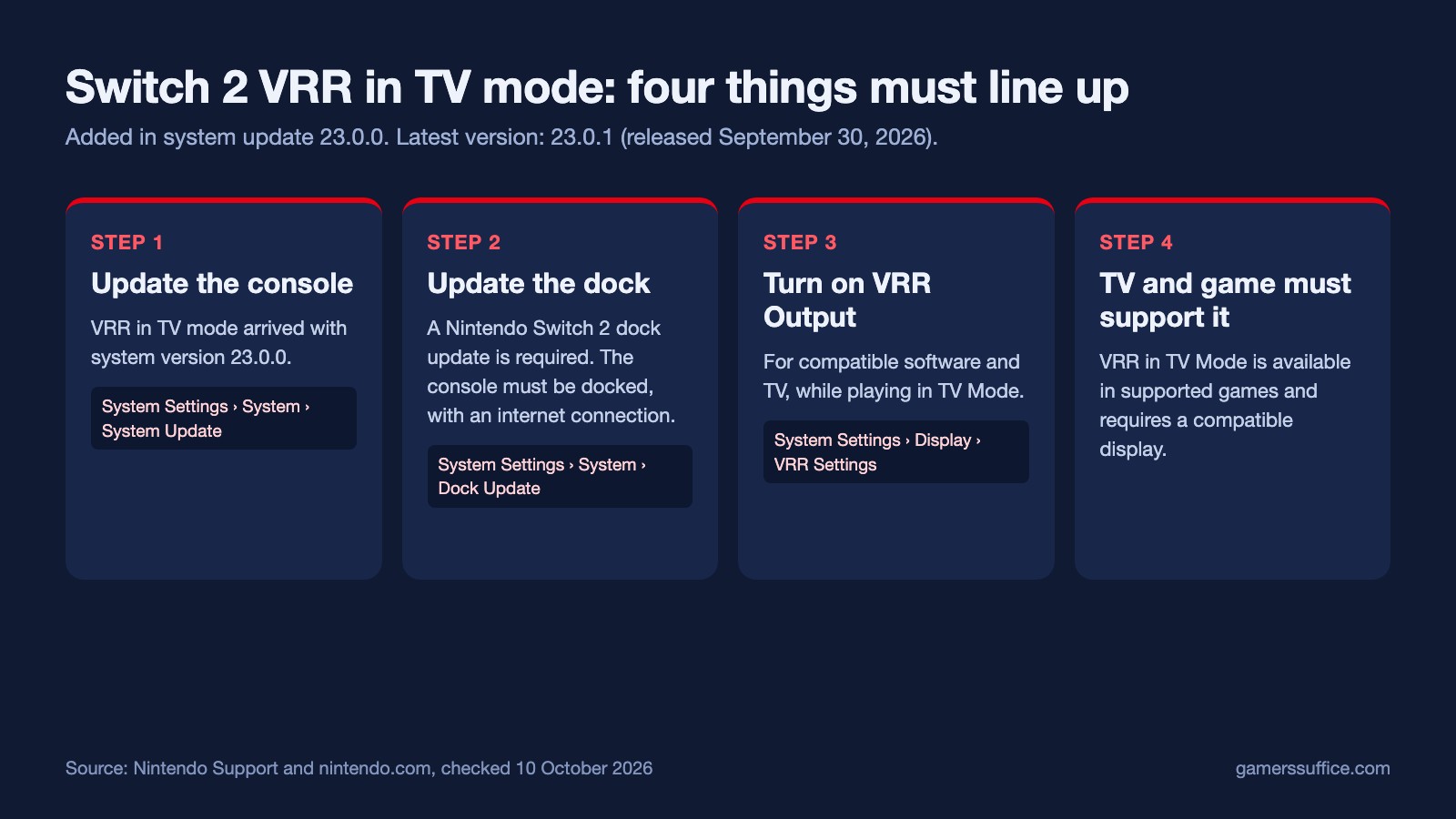
Four things have to line up before VRR does anything on your TV:
- The console is on system version 23.0.0 or later. Nintendo’s update history lists “Added support for VRR (Variable refresh rate) in TV mode” as part of 23.0.0.
- The dock’s firmware is updated. This is a separate update from the console’s own system update.
- VRR Output is switched on in the console’s Display settings.
- The game and the TV both support it. In Nintendo’s words, “When both the software and TV support it, video will be output at a refresh rate that matches the game’s processing.”
Step 1: Update the Switch 2 to the latest system version
Nintendo says that in most situations the console downloads the newest system update automatically while it is online. To check or start it yourself:
- Select System Settings on the HOME Menu.
- Scroll down and select System.
- Select System Update. The console first checks whether an update is available, and the download starts automatically if there is one.
Your current version is shown on that same System screen, under System Update. If the update will not go through, Nintendo’s advice is to restart the console and try again: press and hold the POWER Button for at least three seconds, then select Power Options and restart. If the problem is the connection itself, our guide to fixing Nintendo Switch Wi-Fi problems uses Nintendo’s own steps.
Step 2: Update the Switch 2 dock firmware
Nintendo’s notes for 23.0.0 say the dock update is required for VRR in TV mode. Nintendo’s dock-update article starts with the step you just did, confirming the console has the latest system update, and then has you update the dock from the console. You need the console, the dock and an internet connection, and the console will need to be docked to complete the firmware update.
- Put the Switch 2 in its dock.
- From the HOME Menu, select System Settings, then System.
- Select Dock Update.
- If a popup says the dock is up to date, select OK. Nothing else is needed.
- Otherwise, select Begin Update to update the dock’s firmware.
If the update stops before it finishes, Nintendo’s instruction is simply to try the step again.
Step 3: Turn on VRR Output
- From the HOME Menu, select System Settings.
- Scroll down the menu on the left and select Display.
- Open VRR Settings and turn on VRR Output.
Nintendo describes the setting as being “to be used with compatible software and TV while playing games in TV Mode”.
The same Display menu has a separate 120 Hz Output toggle, which outputs at a higher refresh rate when both the TV and the software support it. Nintendo notes it works only at 1080p and 1440p. That matches the tech specs, which list 120 fps output when 1920×1080 or 2560×1440 is selected, and a frame rate fixed to a maximum of 60 fps for 4K output. Nintendo’s tech specs give the HDMI output’s VRR as up to 120 Hz.
Step 4: Check what your TV reports
System update 23.0.0 also renamed “Dock Output Information” to Video Output Information (System Settings > Display). Nintendo says it “now includes details about the signals that the connected TV can display”. It is the place to look on the console itself if you are not sure what your TV can display.
Which games support VRR in TV mode?
Nintendo’s pages only say VRR in TV mode works in “supported games” and with “a compatible display”. On 10 October 2026 we checked the four Nintendo pages listed in the Sources below: the Switch 2 update history, the Display settings article, and the Switch 2 features and tech-specs pages. None of them names which games support it. So if VRR seems to make no difference with every setting above in place, check whether that particular game supports it.
Does handheld mode have VRR?
Nintendo’s tech specs list the console’s own 7.9-inch screen with VRR up to 120 Hz, and system update 23.0.0 was specifically about adding it in TV mode. Nintendo describes the VRR Output setting above as being for TV Mode.
A note on the date
Nintendo’s own pages disagree by a day. The Switch 2 update history dates version 23.0.0 to September 9, 2026, while the US Switch 2 features page says VRR support in TV mode “was added via a system update released on September 10, 2026”. Both are Nintendo’s wording. We have not resolved the difference and simply report both.
What else system update 23.0 changed
Version 23.0.1 is a small fix. It addresses an issue from 23.0.0 “where software occasionally took a long time to start, pause, or close,” and Nintendo lists it for both Switch 2 and the original Switch. The bigger changes came in 23.0.0, and most of them are listed for Switch 2 only. The table compares what Nintendo’s two update histories list for that version.
| Change in 23.0.0 | Switch 2 | Switch / Lite / OLED |
|---|---|---|
| VRR in TV mode (needs a dock update) | Listed | Not listed |
| System transfer from one Switch 2 to another Switch 2 | Listed | Not listed |
| TV Sound settings saved and applied automatically on up to 8 TVs | Listed | Not listed |
| Start a new GameChat without inviting any friends | Listed | Not listed |
| Play activity combines play time for the same game across multiple systems | Listed | Not listed |
| “Settings” added to Virtual Game Cards on the HOME Menu | Listed | Listed |
| Prompt to start a game with an online license when a virtual game card can’t be ejected from an offline console | Listed | Listed |
| Security vulnerability fix noted | Not listed | Listed |
On the online license: Nintendo says only the user who purchased the software can play it that way. On the original Switch, the 23.0.0 notes also point to Nintendo’s security notice page for a vulnerability fixed in that version.
On the PlayStation side, here is what changed in the latest PS5 system software update. For the full Switch 2 hardware rundown, see our Nintendo Direct recap and Switch 2 specs. More console guides are in our Console section.
Sources
- Nintendo Support: System Update History for Nintendo Switch 2
- Nintendo Support: System Update Information for Nintendo Switch 2
- Nintendo Support: Nintendo Switch System Update Information
- Nintendo Support: System Update History for Nintendo Switch
- Nintendo Support: How to Perform a System Update on Nintendo Switch 2
- Nintendo Support: How to Determine the System Menu Version on Nintendo Switch 2
- Nintendo Support: How to Update the Nintendo Switch 2 Dock Firmware
- Nintendo Support: How to Adjust the Display Settings on Nintendo Switch 2
- Nintendo: Nintendo Switch 2 features
- Nintendo: Nintendo Switch 2 tech specs


